Graphmatica for Mac OS X
Downloading the Mac OS X version
Graphmatica for Mac OS X requires an Intel-based Macintosh and OS X 10.6 (Snow Leopard) or newer. This should include
all machines manufactured since 2010 (plus any older Intel-based machines that have had OS X upgrades applied).
The current download contains English, French, Spanish, and Danish localizations. If you'd like to help with another localization, I have a
number of translations of the Windows version available to work from, so it should only take 3-4 hours of copy-and-paste for someone
fluent in both languages.
Contact me if you'd like to participate.
What's new in version 2.4.1
Bug fixes
- Fixed
y=x^(-(2/3)) to be correctly identified as an even power, so it draws both sides of the graph.
- Fixed a rare memory corruption issue in curve fitting code.
- Added experimental support for parsing constants in C-style exponential
notation like
1.23e4 (must set "expnotation=on" option in graphmat.ini to enable).
- Fixed bug which could cause the "Guess for off-screen intersection" entered
in the Find Intersection dialog box to be ignored.
- Fixed bug which caused Find Intersection on two curves with only a single
point of their domains in common to display a spurious "Cannot solve this
equation using Newton's method" error. The single shared point is now
evaluated to see if it is an intersection or not.
- Adjusted associativity of implied function parameters to assume that a
factor which contains another function call was meant to multiply the first
function call, not the function parameter. For instance,
y = sinx cosx now
parses as y=(sin x)*(cos x) rather than y=sin(x*cos x). You can of course
add explicit parentheses around function parameters to clarify your intent.
- Fixed issues which could cause a fatal error graphing an equation to also
corrupt memory or crash the program.
- Fixed formatting of equations produced by Find Derivative so derivatives of
tan(x) and cot(x) graph correctly on reload.
- Changing Theta Range now redraws the affected polar graphs.
What's new in version 2.4.0
New/improved features
- Curves are now highlighted as you mouse over them or select them in the
equation list.
- Added Pick Line Style to the context menu for equations, allowing you
to choose from solid, dashed, dotted, and dash-dot line styles.
- Fixed-increment Cartesian, polar, and parametric graphs (i.e. with the
step rate specified as a third parameter in the domain) now display as
a series of points; point tables are aligned to display the same values.
- The parser now accepts functions run together with a single-variable
parameter, e.g. y=logx.
- Added support for specifying powers of functions before the parameter
e.g. y=sin^2x or y=cos²x
- Any equation/inequality that is explicitly specified as x=f(y) is now
graphed as a function of y, even if it can be solved for y instead.
Bug fixes
- Fixed bug which could cause graphs to be drawn slightly past the end of
their specified domain.
- Find All Graphs now adjusts the range based only on the requested domain
of the equations (rather than the maximum possible values that would be
visible on the screen with an unrestricted domain).
- Selection highlighting now uses a dark transparent overlay (instead of a
hard to see white overlay) for bright colors other than pure white.
- Fixed a number of issues with graphing inequalities like x < 1/y, where
it is important to evaluate asymptotes as a function of y instead of x.
- Fixed a problem which caused ODEs (and implicit Cartesian functions) to
fail to register (and later disappear) when evaluation failed due to a
non-fatal error (overflow, out of domain, etc.). They now just stop
drawing at that point.
- Eliminated extra vertical asymptote drawn as part of y=acot x.
- Fixed cubert(x) function to be defined for x < 0.
What's new in version 2.3.2
- Fixed bug introduced in Find Intersection (all dependent values zero).
- Fixed issues with restoring custom color schemes and persisting a switch back to the default color scheme.
What's new in version 2.3.1
- Differentiable single-variable equations/inequalities (e.g.
1/x - 2 > 0)
are now solved and rendered more accurately by a new algorithm that uses
Newton's method to find all of the potential solutions and boundaries.
- Improved display of equation parsing errors to indicate the position of the problem where applicable. The
error is displayed in a baloon tooltip (Windows) or popover (Mac/iOS) and you no longer need to dismiss it in order
to edit your equation. In addition, the problem area of the equation is selected for you and the bubble "points to"
the selection in order to help you identify what's wrong with your equation or function defintion.
- Fixed crash when computing critical points for equations containing an expression like "x+0".
- Fixed a number of issues with displaying "holes" in graphs and the Find Critical Points dialog box.
What's new in version 2.3.0
- More colors! There are now 16 slots for graph colors and a palette of 128
possible colors to choose from.
- Added the ability to export graphs as JPG or PNG files. See the Edit -> Export Graphs XXX menu items.
- Printed tangent line/integral information should always reference the
correct entries in the equation list now.
- Fixed bug causing Pick graph color to change strict inequalities from
dashed to solid lines.
- Printing with "Color with White Background" selected for the Printed
Color Scheme no longer changes to the standard white color scheme if you
have defined a custom color scheme and the background is already white.
- Fixed rendering of dashed lines for strict inequalities when "Draw graphs
with wide lines" option is selected.
What's new in version 2.2.5
- Enhanced Paste Data Plot to accept cells with numbers formatted as currency
or percent (all symbols are dropped, but the correct decimal value is
preserved).
- Data Plot window is now hidden by default when loading a graph document
with no data plots.
- Fixed redraw of domain end-caps on curves that use the free variable 'a'.
What's new in version 2.2.4
- Added support for logarithmic curve fit equation type.
- Exponential curve fits are now formatted as y = a * b^x.
- Added Undo support for View -> Find All Graphs
- The Find All Graphs feature now includes data plots in its search for
portions of curves that are not currently visible.
What's new in version 2.2.3
- Fixed potential crash on startup due to uninitialized font information.
- Fixed an infinite loop in calculating point tables for domains starting at
x >= 10000.
- Curve fit equations now display R² (coefficient of determination) instead
of r for non-linear fits to avoid confusion.
- Fixed issue with y=ln x not displaying for certain grid ranges due to prior
fix for CPU spin on certain graphs on log paper.
What's new in version 2.2.2
- Fixed domains in some of the demo files to be parseable when the decimal
separator is set to ','.
- Improved rendering of graphs with highly-vertical segments (including any
graph that crosses y=0) when using logarithmic graph paper.
What's new in version 2.2.1
- Added Email Support option to Help menu. Of course, you were always
welcome to send me mail before, but now you can do it right from the
program.
- Fixed crash switching to logarithmic paper when the range is negative.
- Fixed CPU spin/crash when trying to draw graphs which approach or cross
y=0 when logarithmic paper is selected.
- Avoid CPU spin/crash trying to draw polar paper when the x/y aspect
ratio is much less or greater than 1. Since Quartz is apparently not
able to draw such squashed ellipses, the grid range now resets to the
default when switching to polar paper.
What's new in version 2.2
The
Version 2.2 patch page describes the changes shared between the Mac and Windows versions. In addition, the following fixes and enhacements were made to the Mac version:
-
The Mac OS X help bundle has been rebuilt according to OS X 10.6 standards.
This should resolve any issues you may have experienced with searching
or context help on OS X 10.7 or 10.8.
- Occasionally the annotations might have been drawn with an incorrectly scaled font. This has been fixed.
What's new in version 2.1
The
Version 2.1 patch page lists details on the changes shared between the Mac and Windows versions.
In addition, the following fixes and enhacements were made to the Mac version:
- Added Danish localization for program text.
- Improved speed of printing documents with multiple pages and fixed
print preview to respond immediately to changes in print settings that
affect the number of printed pages.
- Added high resolution program icons (for Retina display MacBook).
- Fixed display of left- and right-side labels on OS X 10.5.
What's new in version 2.0i
The
Version 2.0i patch page lists details on the changes shared between the Mac and Windows versions.
In addition, the following fixes and enhacements were made to the Mac version:
- Find Intersection was not displaying all intersection points on screen automatically upon opening the dialog or selecting a new pair of equations. This has been fixed.
- User-defined functions added to the library shared by all graph documents were being saved but never reloaded from the user defaults. Added code to reload them at startup.
- Version 2.0i is code-signed and set up with appropriate entitlements to run under OS X Lion app sandboxing
(Apple's new way of preventing malicious code from executing and denying any code that does manage to execute
access to your data and system resources). The only difference you should notice is that
the program will now reload any graph documents you had open when you last quit upon restart
(this appears to be a feature you get without even asking for--if you don't like it, just close all of your documents before quitting).
Note for users of version 2.0h: In support of this change, I had to change my bundle identifier
(used to look up your preferences) to com.graphmatica.Graphmatica. To keep using your old preferences,
you will need to rename the defaults file before starting to use the new version. To do that, open a
Terminal window, paste the following commands, and execute them by pressing enter:
cp ~/Library/Preferences/kSoft.Graphmatica.plist ~/Library/Preferences/com.graphmatica.Graphmatica.plist
cp ~/Library/Preferences/kSoft.Graphmatica.LSSharedFileList.plist ~/Library/Preferences/com.graphmatica.Graphmatica.LSSharedFileList.plist
- The program and toolbar icons have been updated with professionally-drawn high-resolution images.
- French and Spanish localizations have been added (to the same binary).
Differences from the Windows version
In general, I've tried to match the features and layout of the Windows
program exactly when possible. In some cases, though, I have made
adjustments to comply with Apple's Human Interface Guidlines, or
otherwise better integrate with the Macintosh user experience.
- The global settings dialog is accessible via the Graphmatica ->
Preferences... menu item (rather than Options -> Settings... on
Windows).
- As the minimum toolbar button size on the Mac is quite large
compared to Windows, I have trimmed down the list of buttons visible on
the toolbar by default a bit. You can customize the toolbar to add some
of the others back if you like.
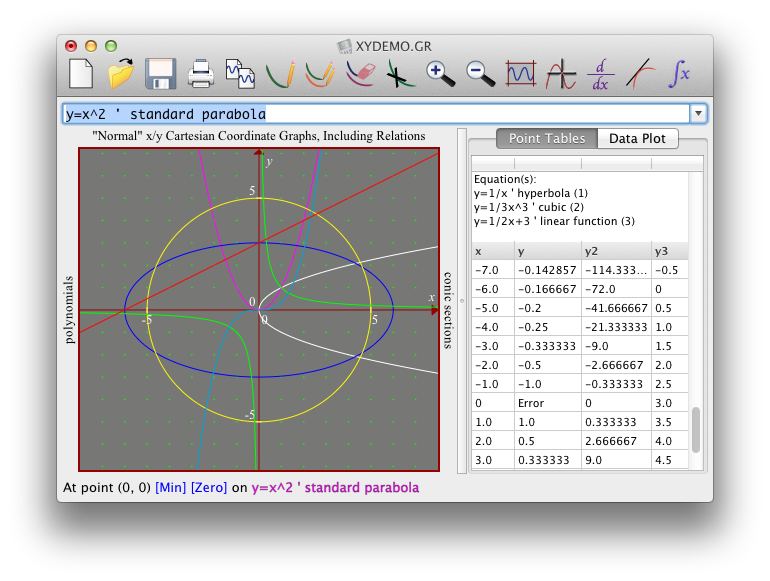
- While their toolbar butons have been removed, you can switch
between the Point Tables and Data Plot windows by clicking the tabs at
the top the the right-hand pane. You need to select one of these options
from the View menu to display this pane when it is hidden, though.
- The Variables Panel is accessible under the Window menu rather than the View menu.
- The Pause Graph button has been removed entirely, as current
machines are faster than human reaction time. In the event that a graph
does not complete within 5 seconds, it will be terminated automatically.
- On newer MacBooks with the "Magic trackpad", the "pinch zoom"
and "two-finger scroll" gestures can be used in addition to the normal
zoom in/zoom out buttons and scrollbars to change the scale or scroll
the grid when the mouse cursor is over the grid.
- As Ctrl + scroll wheel seems to be hardwired to control screen
magnification on the Mac, you can use Command + scroll wheel instead as
an alternative zoom mechanism.
- The Edit -> Copy Graphs menus make the graphs available in
both TIFF (raster) and PDF (vector) formats simultaneously. (However,
good luck finding an application that will let you paste the PDF
format.) As on the Windows version, the raster output resolution is
based on the current window size. For better print quality, make your
window as large as possible before copying. (Note, however, that the
color depth is quite high and apparently impossible to decrease, so the
resulting bitmap could take several MB of memory.)
- Enhanced undo support including draw/hide/delete graph operations.
- As the standard mechanism for displaying modal dialog boxes on the Mac is a
"sheet" that slides down from the title bar of the window, blocking the view of the grid,
the numerical evaluation dialogs are implemented as modeless, float-on-top panels.
Known issues
You need not write me to report these; I am already planning to address them as soon as my schedule permits.
- Word-wrap for long equations in the Point Tables grid is done based on a conservative fixed-width font size, which may result in extra blank space below the equations when using a variable-width font in the table.
- The columns in the Point Tables grid cannot be resized except
by using the blank header row at the top. This appears to be per Apple's
intentional design.
- The horizontal scrollbar in the Point Tables will only appear
if you a) enable it in the global settings and b) drag the last columns
to extend past the width of the window.
- The columns in the results table of the Point Evaluate dialog
box may not resize evenly when switching between equations with a
different number of results columns.
- The mouse cursor may not switch from the normal arrow shape to
the crosshairs correctly when the grid window does not have keyboard
focus. Clicking on the grid should clear this up.
kSoft, Inc. ksoft@graphmatica.com
Last updated: Sat 29 Apr 2017